
LiteRT.js Browser AI Without a Server
A production-minded LiteRT.js guide for running compatible AI models locally in the browser, from conversion and WebGPU execution to fallbacks, memory cleanup, caching, and testing.
 By Amaresh Adak13 min read
free tools · most run in your browser · no signupfree developer tools/most run right in your browser/no signup needed
A production-minded LiteRT.js guide for running compatible AI models locally in the browser, from conversion and WebGPU execution to fallbacks, memory cleanup, caching, and testing.
By Amaresh Adak13 min readFree toolkit
85+ private dev tools
Everything runs in your browser. Zero tracking, no sign-up.
Browse toolsLiteRT.js browser AI moves compatible model inference out of a hosted API and onto the user's device. That can remove a network round trip, keep inputs local, and eliminate per-request inference charges—but only if the model, browser, preprocessing pipeline, and download budget fit the job. This guide builds the execution path and covers the production constraints missing from most launch summaries.
In this guide, you'll learn:
LiteRT.js is Google's JavaScript binding for the LiteRT on-device inference runtime. It loads .tflite models in a web application and executes them through WebAssembly, WebGPU, or the emerging WebNN path. It is a runtime, not a hosted model, training service, or automatic AI feature.
That distinction cuts through the release-day hype. You still need to provide:
Google announced LiteRT.js on July 9, 2026. Its published benchmarks report up to 3× faster execution than other tested web runtimes across selected CPU and GPU workloads, and 5–60× GPU or NPU speedups over CPU in selected models. Those are vendor results from a controlled 2024 M4 MacBook Pro setup—not a promise for every model or client device. Benchmark your own graph, input size, browser, and hardware before making a latency claim.
The privacy benefit also needs precise wording. Inputs can remain on the device if your application does not upload them elsewhere. Analytics, error reporting, remote preprocessing, or a fallback cloud API can still transmit user data. Client-side architecture helps; it does not certify the whole application.
This local-processing model fits the same privacy argument behind browser-based developer tools: sensitive data does not need to cross a network merely because the interface lives on the web.
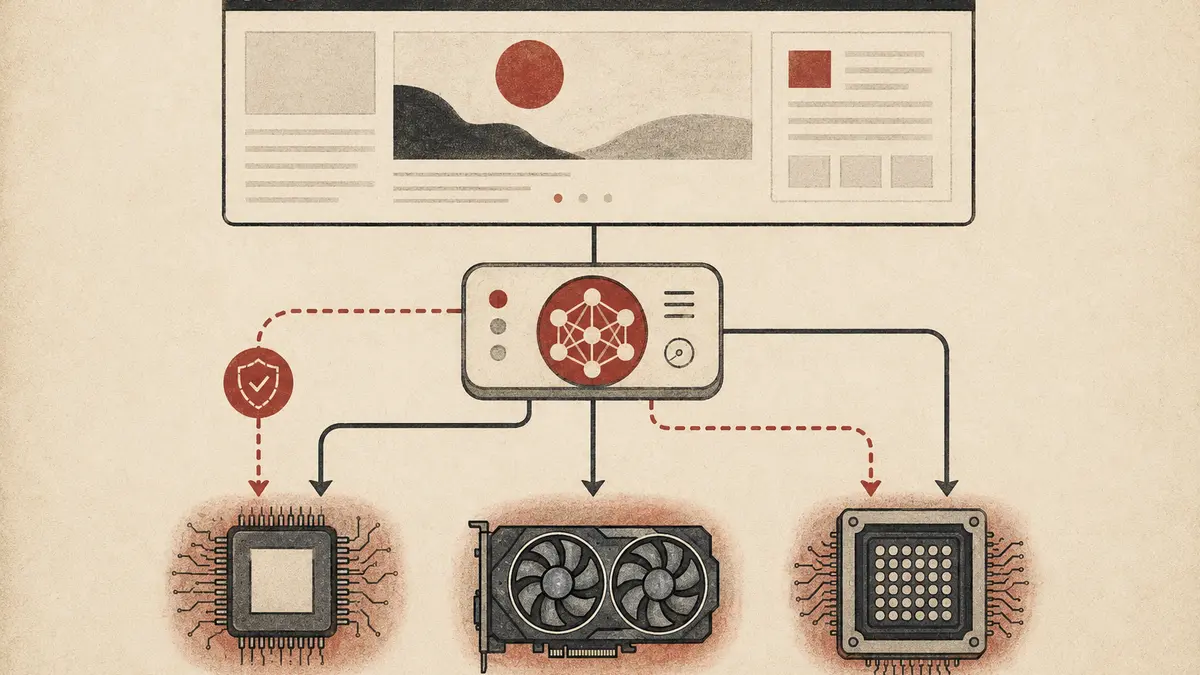
LiteRT.js loads its WebAssembly runtime, fetches a .tflite model, compiles that graph for the requested accelerator, and executes tensors locally. Application code talks to one JavaScript API while the runtime maps supported operations to the available backend.
| Accelerator | Execution path | Production status | Best starting point |
|---|---|---|---|
wasm |
CPU through WebAssembly and XNNPACK | Broadest compatibility | Baseline and fallback |
webgpu |
GPU through the browser WebGPU API | Available in modern browsers, with implementation differences | Vision, audio, and compute-heavy supported graphs |
webnn |
NPU or system ML framework through WebNN | Experimental; flags and JSPI may be required | Controlled experiments, not a universal default |
Requesting WebGPU or WebNN does not mean every operation stays on that accelerator. Google's documentation says unsupported operations can fall back to CPU. A graph with frequent fallback boundaries may perform worse than expected because tensors move between execution paths.
WebGPU support is wider than WebNN, but “supported” is not the same as “fast.” Integrated GPUs, driver versions, browser power policies, thermal throttling, and memory pressure all affect results. The WebGPU standard exposes modern GPU compute to the web, but LiteRT.js still has to lower each model operation to a supported implementation.
If you already have a compatible .tflite model, start there. For PyTorch, Google documents a direct conversion route through litert_torch:
import torch
import torchvision
import litert_torch

weights = torchvision.models.ResNet18_Weights.IMAGENET1K_V1
model = torchvision.models.resnet18(weights=weights).eval()

sample_inputs = (torch.randn(1, 3, 224, 224),)
edge_model = litert_torch.convert(model, sample_inputs)
edge_model.export("resnet18.tflite")
The sample input is not ceremonial. It fixes the input signature the converter traces. Google's current guide requires models to be compatible with torch.export.export, which means no Python conditional branch may depend on runtime tensor values. It also says dynamic input and output dimensions—including a dynamic batch dimension—are unsupported in this conversion path.
Before building the browser UI, record the contract:
| Detail | ResNet18 example |
|---|---|
| Input shape | [1, 3, 224, 224] |
| Layout | NCHW |
| Data type | float32 |
| Pixel range | Normalized after scaling to [0, 1] |
| Channel normalization | ImageNet mean and standard deviation |
| Output | Class scores for the configured labels |
Most “the model runs but predictions are nonsense” bugs are contract bugs: RGB versus BGR, NHWC versus NCHW, wrong normalization, incorrect label order, or an input dimension silently changed during conversion. Use model.getInputDetails() and model.getOutputDetails() to compare the compiled graph with your assumptions.
Install the runtime:
npm install @litertjs/core
The package includes WebAssembly assets under node_modules/@litertjs/core/wasm/. Copy that complete directory to a public path in your build; importing the JavaScript package alone is insufficient.
import {
  Tensor,
  loadAndCompile,
  loadLiteRt,
} from "@litertjs/core";

await loadLiteRt("/litert-wasm/");

const model = await loadAndCompile("/models/resnet18.tflite", {
  accelerator: "webgpu",
});

const input = new Float32Array(1 * 3 * 224 * 224);
const inputTensor = new Tensor(input, [1, 3, 224, 224]);

const outputs = await model.run(inputTensor);
const probabilities = await outputs[0].data();

inputTensor.delete();
for (const output of outputs) {
  output.delete();
}

console.log(probabilities.length);
This code is deliberately incomplete as an image classifier: the zero-filled array only proves that the graph accepts the expected shape. A real pipeline must decode pixels, resize them, normalize channels exactly as the model expects, transform NHWC browser pixel data to NCHW when required, and map output indices to the correct label file.
Do that work away from the main interaction path. Model compilation and preprocessing can stall a page even when inference later runs on the GPU. A Web Worker is appropriate for CPU-heavy decoding or preprocessing, though GPU access and transfer costs should be measured rather than assumed.
Do not select a backend from navigator.gpu alone. WebGPU presence says nothing about whether your specific graph compiles successfully. Attempt the preferred backend, capture the failure, and compile a CPU version.
import { loadAndCompile } from "@litertjs/core";

type Accelerator = "webgpu" | "wasm";

async function compileModel(url: string) {
  const attempts: Accelerator[] = ["webgpu", "wasm"];
  const failures: Array<{ accelerator: Accelerator; error: unknown }> = [];

  for (const accelerator of attempts) {
    try {
      const model = await loadAndCompile(url, { accelerator });
      return { model, accelerator };
    } catch (error) {
      failures.push({ accelerator, error });
    }
  }

  throw new AggregateError(
    failures.map((item) => item.error),
    "The model failed on WebGPU and WebAssembly",
  );
}
Fallback is a product decision, not just an exception handler. Tell users when a slower mode is active if it changes expected responsiveness. If CPU inference is unusably slow, disable the feature cleanly instead of freezing the interface.
WebNN should be opt-in for now. Google's current documentation describes it as experimental, unavailable by default in browsers, and dependent on platform-specific drivers plus JavaScript Promise Integration. Shipping a code path that only works after users edit browser flags is a lab feature, not production compatibility.
LiteRT.js tensors own runtime resources. JavaScript garbage collection does not know when the native or GPU allocation is safe to release, so call .delete() on input and output tensors when finished.
Use try/finally in application code because preprocessing, execution, or post-processing can throw:
import { Tensor } from "@litertjs/core";

async function infer(model: Awaited<ReturnType<typeof compileModel>>["model"], data: Float32Array) {
  const input = new Tensor(data, [1, 3, 224, 224]);
  let outputs: Awaited<ReturnType<typeof model.run>> = [];

  try {
    outputs = await model.run(input);
    return await outputs[0].data();
  } finally {
    input.delete();
    for (const output of outputs) {
      output.delete();
    }
  }
}
Do not call delete() before an asynchronous read completes. Also avoid retaining output tensors in component state. Convert the values you need to ordinary typed arrays or small domain objects, then release the runtime objects.
If you combine LiteRT.js with TensorFlow.js preprocessing, clean up both libraries' tensors. Google recommends tf.tidy() for synchronous intermediate work and explicitly warns against dataSync() on the WebGPU backend because forced synchronous reads carry a significant performance penalty.
Local inference removes recurring API traffic, but it adds a large initial download and a cold compile. A model that feels instant on a developer laptop may be unacceptable on mobile data or a low-memory device.
Treat model delivery as a separate performance budget:
Uint8Array to the loader.The site's frontend performance guidance already argues for moving genuinely compute-heavy work to WebAssembly. LiteRT.js makes that path practical for compatible ML graphs, but it does not remove normal web-performance discipline.
Google provides @litertjs/model-tester to run a model with random inputs across available backends and benchmark repeated execution:
npm install --save-dev @litertjs/model-tester
npx model-tester
Run it before writing the full preprocessing pipeline. This catches unsupported operations and backend compilation failures while the problem is still isolated.
Then maintain a real compatibility matrix:
| Test | What it catches |
|---|---|
| Cold load on throttled network | Model-download and compilation pain |
| WebGPU and Wasm output comparison | Backend-specific numerical drift |
| Repeated inference loop | Tensor leaks and thermal slowdown |
| Background/foreground cycle | Device loss and stale resource handling |
| Low-memory mobile device | Crashes hidden by desktop testing |
| Offline reload after first use | Missing runtime or model cache entries |
| Correctness fixtures | Shape, layout, normalization, and label regressions |
Performance tests need warm-up runs. First execution may include compilation and cache work that later calls avoid. Report median and tail latency separately, along with browser, device, model version, accelerator, and input shape. A single “runs in 20 ms” number without that context is nearly useless.
LiteRT.js is not a blanket replacement for TensorFlow.js. It is strongest when you already use .tflite, want the LiteRT cross-platform toolchain, or need its native runtime and hardware paths. TensorFlow.js remains useful for its mature JavaScript ecosystem, browser-side tensor operations, training support, and existing models.
| Requirement | Prefer LiteRT.js | Prefer TensorFlow.js |
|---|---|---|
Existing .tflite deployment |
Yes | Usually no |
| Shared mobile and web runtime format | Yes | Depends on the stack |
| Browser-side training | No | Yes |
| Mature JS preprocessing ecosystem | Use interop when needed | Yes |
| Direct PyTorch-to-LiteRT conversion | Yes, for export-compatible graphs | Different conversion path |
| Experimental WebNN access | Available with constraints | Not the primary reason to choose it |
Google documents an interop package, @litertjs/tfjs-interop, specifically so teams can keep TensorFlow.js preprocessing and post-processing while replacing only model execution. Migration does not need to be ideological or all at once.
Keep inference on a server when the model is too large for practical delivery, must remain proprietary, changes too frequently to cache effectively, requires centralized GPU memory, or needs server-only data. Cloud execution is also cleaner when you require identical hardware, controlled versions, centralized observability, or rapid rollback.
Client-side inference is a poor security boundary for model weights. If the browser can download a model, a determined user can retrieve it. Obfuscation changes effort, not ownership.
Hybrid designs are often stronger: run a small classifier, embedding model, or privacy filter locally; send only the approved or reduced representation to a server for heavier work. The right split comes from data sensitivity, model size, latency, device coverage, and operational control—not from a blanket “edge good, cloud bad” rule.
LiteRT.js is Google's JavaScript binding for running compatible LiteRT .tflite models inside web applications. It supports local execution through WebAssembly, WebGPU, and an experimental WebNN path rather than calling a hosted inference API.
The WebAssembly path offers the broadest reach, while WebGPU availability and performance vary by browser, operating system, GPU, and driver. WebNN is still experimental and may require browser flags, JSPI, and platform-specific hardware support.
Google reports strong gains on selected models and hardware, but there is no universal winner. Model operations, tensor layout, fallback boundaries, browser implementation, warm-up, and device hardware determine actual latency; benchmark your exact pipeline.
LiteRT.js can run compatible models, while Google separately provides LiteRT-LM.js for supported browser LLM packages. Large language models bring much larger download, memory, startup, and device-coverage constraints than classical vision, audio, or embedding models.
No. It can keep model inputs local, but the rest of the application may still transmit analytics, logs, outputs, or fallback requests. Verify the complete data flow and communicate it accurately.
LiteRT.js makes local web inference a credible production option for the right model, but the runtime is only one layer. The real engineering work is preserving the model contract, selecting and testing backends, releasing tensors, budgeting downloads and memory, and degrading cleanly on unsupported devices. Start with a small measurable feature, prove correctness across Wasm and WebGPU, and expand only after the compatibility data supports it.
Comments
Sign in to join the discussion.
No comments yet. Be the first to share your thoughts.