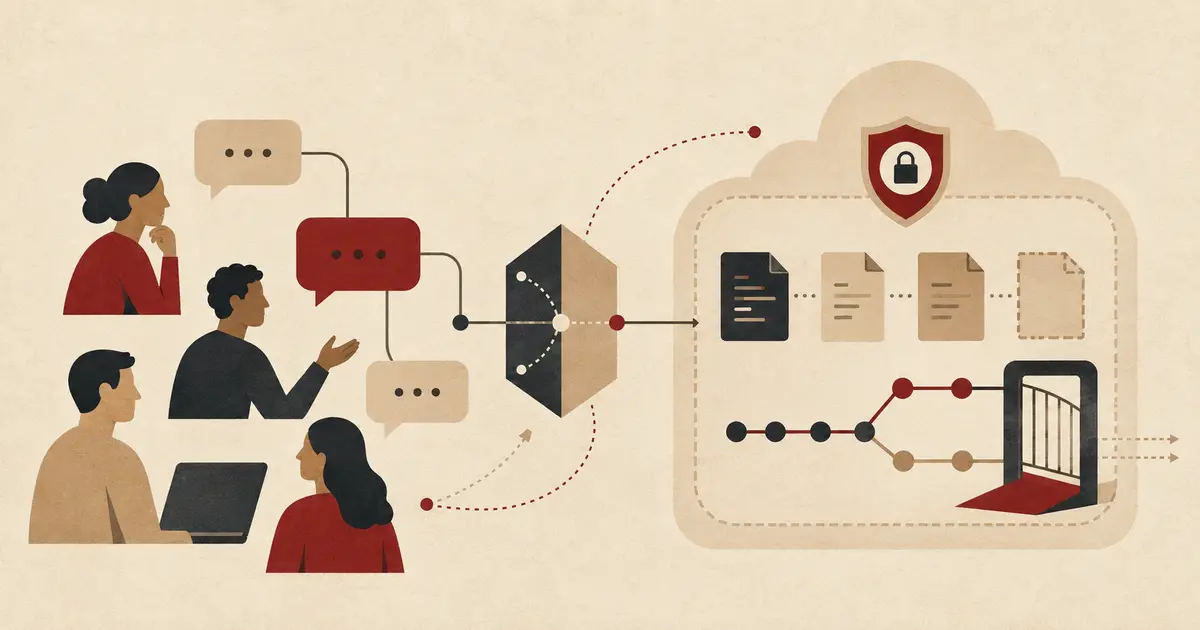
The GitHub Copilot Slack integration can turn a team conversation into an issue, a cloud-agent session, or a pull request without moving the discussion into an IDE. The useful part is shared context; the risky part is also shared context, because an entire thread can become input to the agent and persist in the artifacts it creates.
This guide sets up the integration as an engineering workflow rather than a chatbot shortcut. It covers identity, repository access, review gates, sandbox behavior, prompt structure, cost, and rollout checks that GitHub's quick-start instructions leave to your team.
Table of contents#
What the GitHub Copilot Slack integration actually does#
GitHub released the new Slack experience in public preview on August 21, 2026. Mentioning @GitHub in a direct message, channel, or thread can start a Copilot cloud-agent session that uses the Slack conversation and permitted repository context to:
- answer questions about code and GitHub activity;
- create or update issues;
- investigate a failure and propose a plan;
- change code inside a cloud sandbox;
- validate the change and open a pull request.
This is not an agent running inside Slack. Slack supplies conversation context and a control surface; Copilot cloud agent performs the coding work asynchronously in a GitHub-hosted sandbox. The resulting issue, branch, commit, or pull request remains a GitHub artifact governed by repository permissions and rules.
When work becomes a coding task, Copilot can create a dedicated Slack Code channel. The channel shows the repository, branch, session status, model, and linked artifacts. It is designed for one task at a time, and once created, steering should continue in that code channel rather than in the original thread.
That separation is worth preserving. A broad planning thread may contain several requests, assumptions, and side conversations. A one-task channel gives the agent and reviewers a smaller decision record.
| Surface |
Best use |
Main risk |
| Direct message |
Private investigation or a task performed with the user's identity |
Personal repository permissions may be broader than intended |
| Shared thread |
Team decisions, triage, and collaborative steering |
The full thread becomes context and artifacts use the app identity |
| Slack Code channel |
Focused implementation and review of one agent session |
Teams may treat a preview channel as a substitute for pull-request review |
| GitHub pull request |
Final diff, checks, ownership, and merge decision |
Weak rulesets can allow insufficient human review |
Who can use Copilot from Slack#
GitHub's current integration documentation lists the cloud agent integration as available on paid Copilot plans. The August 21 release post initially described the public preview for Copilot Business and Enterprise organizations, so administrators should treat the live documentation and their own policy UI as the availability source of truth.
The prerequisites are more specific than “install the Slack app”:
- The user needs a GitHub account with paid Copilot access.
- The Slack workspace needs the official GitHub integration.
- Cloud sandboxes and Copilot cloud agent must be enabled for the plan.
- The GitHub app must be allowed to access the target repository.
- The person starting code changes needs
write access to that repository.
Business and Enterprise members may be blocked until an organization or enterprise owner enables the cloud-agent policy. Repository owners can also opt repositories out. Slack installation, Copilot entitlement, cloud sandbox policy, and repository access are separate gates; a green check on one does not prove the others are configured.
Guests in the Slack workspace and outside collaborators to repositories cannot start or steer Copilot sessions from Slack. Participants who cannot trigger the agent may still contribute ordinary discussion, but an authorized team member should verify which messages will become session context before invoking it.
How do you install and connect the integration#
Install or upgrade the official GitHub app for Slack. Workspaces using a version from before the August 2026 rollout may need an upgrade to receive the new permissions and agent features.
After installation, invite the app into an approved channel:
/invite @github
Then mention the app and follow the connection prompts:
@GitHub help
The first use links the Slack member to a GitHub account. In a channel, an authorized member can open the shared settings and select a default repository:
@GitHub settings
The default repository is channel-wide, not personal. Changing it changes the default for everyone using Copilot in that channel. Direct messages do not have a channel default repository. If a channel has no default, the repository used in its first session becomes the default.
For a production rollout, do not rely on that implicit first-session behavior. Create channels with a clear repository purpose, configure the default deliberately, and still name the repository and branch in change-making prompts.
Before inviting the app broadly, verify that the operator's GitHub identity has the intended repository permissions. The following executable check uses GitHub CLI and requires authentication through gh auth login:
#!/usr/bin/env bash
set -euo pipefail

repo="octo-org/octo-repo"

gh api "repos/$repo" \
  -H "X-GitHub-Api-Version: 2022-11-28" \
  --jq '{full_name, default_branch, archived, permissions}'
Look for permissions.push: true when the user is expected to start coding tasks. Also confirm that archived is false and that the default branch matches the team's assumption.
How do direct messages and shared threads differ#
Identity changes with conversation type.
In a direct message, Copilot acts using the permissions of the linked personal GitHub account. Pull requests and issues can therefore be created as actions for that user. In a shared channel or group thread, Copilot creates artifacts under its app identity instead of impersonating one participant.
That difference changes review behavior. A shared-context pull request is not attributed to a human author. When a repository ruleset already requires at least one approval, GitHub enables an additional approval for unattributed Copilot pull requests by default. A rule requiring one approval therefore requires two people with write access for this kind of pull request.
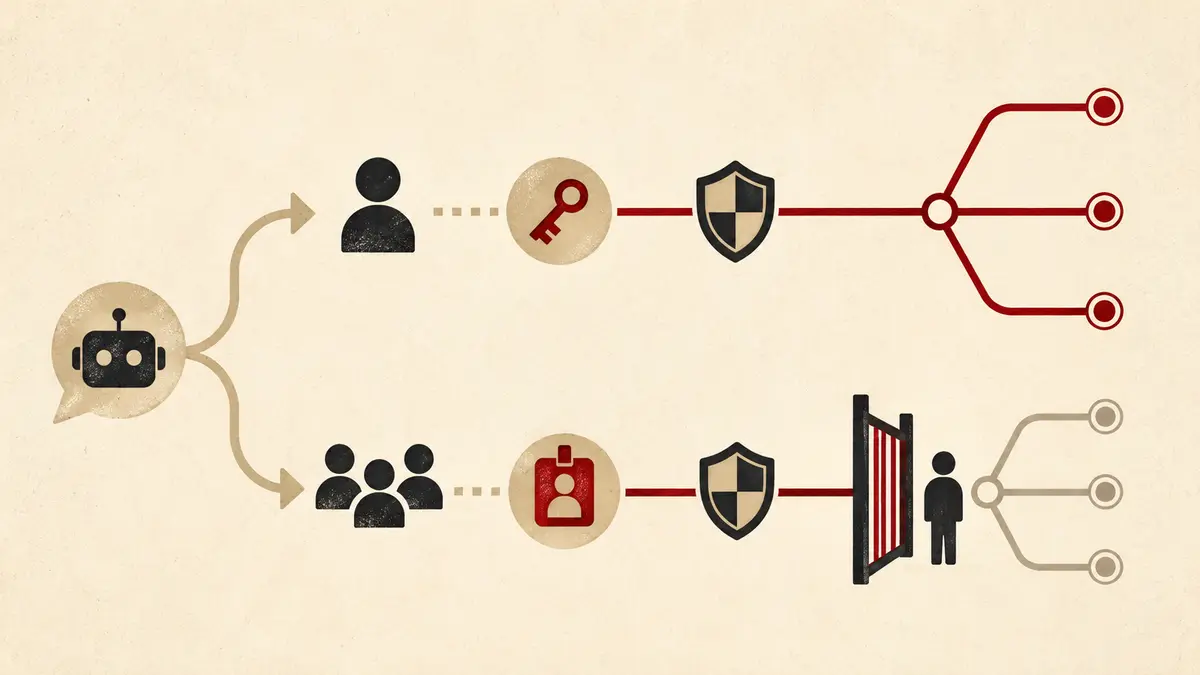
The extra-approval rule has no effect when the repository requires zero approvals. Do not assume “enabled by default” protects a repository with no pull-request gate.
Use direct messages to minimize Slack context, not to avoid governance. Use shared threads when the team needs a visible decision record, and let the app identity trigger stricter review. In both cases, the pull request—not the Slack confirmation—is the merge boundary.
Control repository and branch selection#
Copilot can infer the repository from the channel default and the branch from the repository default. That is convenient for questions and dangerous for changes when one channel discusses several services.
Name both explicitly:
@GitHub In octo-org/billing-api on branch develop, investigate why duplicate
invoice events are accepted. First produce a plan. Do not edit migrations or
deployment files. Add a regression test, run the existing test command, and
open a draft pull request with assumptions and unresolved risks.
GitHub's cloud agent is constrained to one working branch. For a new task, it normally creates a copilot/ branch and cannot push directly to the default branch. Its credentials are restricted, and the agent cannot approve or merge its own pull request.
Still, repository rules must enforce the team's actual delivery policy. Check the active rules applied to the default branch:
#!/usr/bin/env bash
set -euo pipefail

repo="octo-org/octo-repo"
branch="$(gh api "repos/$repo" --jq '.default_branch')"

gh api "repos/$repo/rules/branches/$branch" \
  -H "X-GitHub-Api-Version: 2022-11-28" \
  --jq 'map(.type)'
Expect a pull-request rule, required checks or workflows, and force-push protection for important branches. Add CODEOWNERS protection for sensitive areas such as authentication, billing, infrastructure, and agent configuration.
This complements the local boundary described in the VS Code agent sandboxing guide. Slack-triggered Copilot uses a cloud sandbox, while IDE agents can use local or remote sandboxes; neither replaces branch rules and human review.
Protect pull requests created from Slack#
GitHub applies several cloud-agent controls: the agent works on one branch, cannot merge its own pull request, and normally requires human approval before Actions workflows run on agent-authored code. Repository protections and required checks still decide whether the change can reach the default branch.
A safe baseline includes:
- at least one ordinary required approval;
- the additional approval for unattributed Copilot pull requests;
- required status checks or required workflows;
- CODEOWNERS review for sensitive paths;
- dismissal or reapproval rules after new pushes;
- secret scanning and code scanning where available;
- no bypass permission for the Copilot app identity.
The person who initiated a Copilot pull request cannot approve that same change to satisfy the ordinary reviewer separation. That is a useful control, but teams should still define who owns final validation. “Anyone in the channel” is not an accountable reviewer role.
Do not automatically enable Actions for every agent branch merely to make demos faster. Workflow files can execute code with repository secrets and elevated tokens. Start with the default approve-and-run gate, inspect workflow changes, and narrow permissions before considering automation.
Write prompts that produce reviewable work#
Conversation history supplies background, but it does not replace an acceptance contract. A useful change prompt should state:
- repository and target branch;
- the observed problem and expected behavior;
- files or subsystems that are in and out of scope;
- tests and validation commands;
- whether the first output should be research, a plan, issues, or code;
- the required artifact, usually a draft pull request;
- assumptions that must be surfaced rather than guessed.
Prefer a two-stage workflow for consequential changes. First ask for investigation and a plan. After the team corrects assumptions, authorize implementation in the dedicated code channel.
Repository instructions reduce repetition. Add concise build and test guidance to .github/copilot-instructions.md:
## Validation

- Install dependencies with `npm ci`.
- Run unit tests with `npm test -- --runInBand`.
- Run linting with `npm run lint`.
- Do not edit deployment manifests unless the task explicitly requires it.
- Never add credentials, tokens, or production data to tests.
Keep these instructions version-controlled and review changes to them like code. If you package skills or MCP configuration for several agent clients, the Agent Plugins 1.0 guide explains where portable configuration ends and client-specific governance begins.
What context should never enter a Slack agent thread#
GitHub states that Copilot captures the entire invoked thread and uses all its messages to inform the work. That context is stored in the artifacts the agent generates. A later @GitHub mention can therefore promote earlier discussion into a longer-lived engineering record.
Do not place secrets, access tokens, private keys, production customer data, unredacted incident payloads, or legally restricted material in a thread that might invoke the agent. Deleting a Slack message later should not be treated as proof that derived GitHub artifacts were erased.
Use a direct message when the full channel history is unnecessary, but remember that the GitHub artifact can still contain summaries, issue descriptions, commits, logs, and pull-request text. Replace sensitive values with synthetic fixtures before the session starts.
Prompt injection is also a context risk. Copilot filters hidden characters such as instructions embedded in HTML comments, but ordinary visible text from issues and conversations can still be malicious or wrong. Treat pasted third-party content as untrusted evidence, restrict tools and network access, and review every generated change.
Roll out the integration without losing oversight#
Start with a small allowlist of low-risk repositories and a few maintainers. Do not begin with authentication, payment, infrastructure, or repositories that lack tests.
Track at least:
| Measure |
What it answers |
Guardrail |
| Sessions started |
Is the integration being adopted? |
Separate experiments from production tasks |
| Draft pull requests created |
Does conversation turn into reviewable work? |
Do not count creation as success |
| Merge rate |
Are changes useful enough to ship? |
Review quality and task difficulty |
| Median time to merge |
Does the workflow reduce cycle time? |
Compare similar repositories and task types |
| Rework or rollback rate |
Are merged changes stable? |
Include post-merge incidents and reversions |
| Actions minutes and AI credits |
What does each workflow cost? |
Set budgets before broad enablement |
The cloud agent consumes both GitHub Actions minutes and AI credits. The GitHub Copilot AI credits guide covers budget behavior, while the Copilot usage metrics API guide shows how to avoid misleading adoption counts.
After a pilot, expand by repository risk tier rather than enabling every workspace channel at once. Public preview behavior can change, so record the tested app version, enabled policies, repository allowlist, ruleset baseline, and rollback owner.
Frequently asked questions#
Does GitHub Copilot read the entire Slack channel?#
GitHub documents the entire invoked conversation or thread as context, not every unrelated message in the workspace. Keep the invocation in a focused thread or direct message, because every message in that conversation can inform the work and persist in generated artifacts.
Can anyone in Slack start a Copilot coding task?#
No. The user needs linked GitHub access, an eligible paid Copilot plan, enabled cloud-agent policies, and write access to the target repository. Slack guests and outside repository collaborators cannot start or steer sessions.
Which identity creates a pull request from Slack?#
Direct-message actions use the linked user's permissions. In shared threads and channels, Copilot creates artifacts under its app identity. Shared-context pull requests can require one additional human approval when the repository already requires at least one.
Can Copilot merge the pull request it creates?#
No. GitHub's cloud-agent controls prevent Copilot from approving or merging its own pull request. A human must review and merge it, subject to branch protections, rulesets, and required checks.
Does Slack-triggered Copilot bypass GitHub permissions?#
No. The integration is bounded by the GitHub app's repository access, the initiating user's permissions, cloud-agent policy, branch protections, rulesets, and workflow approval controls. Slack is an initiation and collaboration surface, not a permission bypass.
Conclusion#
The GitHub Copilot Slack integration is most useful when a conversation already contains the decision context needed to start engineering work. Production safety depends on making that context boundary intentional, distinguishing personal and app identities, naming the repository and branch, requiring human review, and keeping the cloud agent behind repository rules.
Treat the public preview as a controlled delivery channel. GitHub's official Slack integration documentation is the live setup reference, and the August 21 release note records the feature's launch scope.
 By Amaresh Adak13 min read
Comments
Sign in to join the discussion.
No comments yet. Be the first to share your thoughts.