MCP authentication is the line between “an AI agent can call a useful tool” and “anything that can reach your endpoint can touch user data.” Local MCP demos can survive with environment variables and a trusted laptop. Remote MCP servers cannot. Once your server sits behind HTTP and connects to documents, email, databases, ticketing systems, or source code, you need real identity, scoped authorization, token validation, and auditability.
In this guide, you'll learn:
- What MCP authentication actually protects
- How MCP authentication works in a remote server
- Local STDIO, remote HTTP, and enterprise auth compared
- Implementation checklist for MCP authentication
- Where MCP authentication breaks in production
- Frequently Asked Questions
- Final Takeaway
What MCP Authentication Actually Protects#
MCP lets an AI host connect to tools, resources, and prompts through a standard protocol. That is useful because one agent runtime can discover and call many external systems without every integration being custom-built from scratch. The security problem is just as obvious: once a model can call tools, the tool boundary becomes a real application boundary.
Authentication answers: who is calling this server?
Authorization answers: what is this caller allowed to do?
For a remote MCP server, those two checks must happen before tool execution. If your server exposes tools like search_documents, create_ticket, query_customer, or run_sql, an unauthenticated request is not a harmless protocol message. It is an untrusted actor asking your system to do work.
The official MCP authorization guide says authorization is strongly recommended when a server accesses user-specific data, needs audit trails, grants access to consent-protected APIs, serves enterprise environments, or needs per-user usage controls. That is most production MCP work, not an edge case. See the official MCP authorization guide for the protocol-level flow.
A cleaner mental model:
| Server type |
Typical location |
Acceptable auth pattern |
Risk level |
| Local STDIO server |
User machine |
Environment credentials, local app credentials, OS account context |
Medium |
| Private remote server |
Internal network |
OAuth-style authorization, short-lived tokens, gateway policy, audit logs |
High |
| Public remote server |
Internet-facing |
OAuth 2.1-style flow, PKCE, resource indicators, strict token validation, least-privilege scopes |
Very high |
| Enterprise shared server |
Org-wide agent platform |
Central IdP, managed authorization, group or role mapping, audit pipeline |
Very high |
The mistake is treating MCP like a plugin format. In local toy projects, that shortcut feels fine. In production, MCP is closer to an API gateway for agent actions. If you would not expose the same operation as an unauthenticated REST endpoint, do not expose it as an unauthenticated MCP tool.
For related reading on permission boundaries, see Your AI Coding Agent Needs a Permission Contract, Not Just a Prompt. If your risk is tool misuse during code review, pair this with AI code review in 2026 - a workflow that survives the PR flood.
How MCP Authentication Works in a Remote Server#
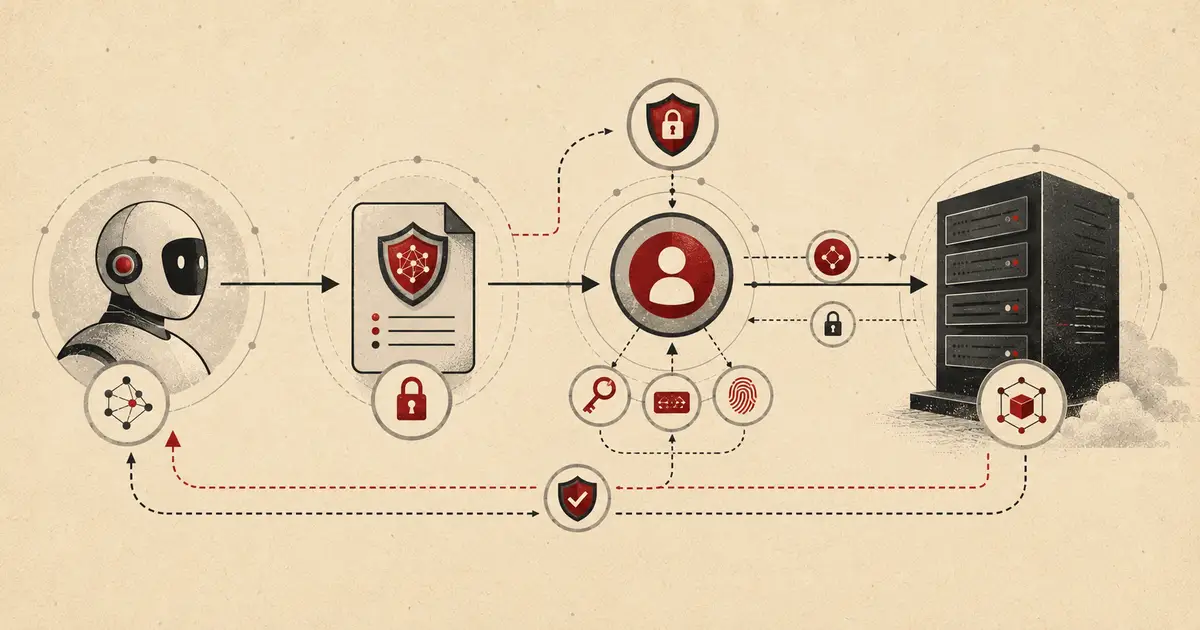
For remote servers, the practical flow is OAuth-style authorization with MCP-specific discovery and resource binding. The client tries to access the MCP server. The server refuses the unauthenticated request and points the client to a protected resource metadata document. The client uses that metadata to find the authorization server, request consent, obtain a token, then call the MCP server with a bearer token.
A simplified first response looks like this:
HTTP/1.1 401 Unauthorized
The protected resource metadata document describes the protected MCP resource and the authorization servers trusted for that resource:
{
  "resource": "https://mcp.example.com/mcp",
  "authorization_servers": ["https://auth.example.com"],
  "scopes_supported": [
    "mcp:tools:read",
    "mcp:tools:write",
    "mcp:resources:read"
  ]
}
That resource value matters. The MCP authorization specification says MCP servers must implement OAuth 2.0 Protected Resource Metadata, and MCP clients must use that metadata for authorization server discovery. It also says clients must include the OAuth resource parameter in authorization and token requests so tokens are bound to the intended MCP server. Read the official MCP authorization specification before building anything that touches real accounts.
The authorization request should include PKCE and a resource indicator:
GET /authorize?
response_type=code&
client_id=client_123&
redirect_uri=http://localhost:8400/callback&
scope=mcp:tools:read&
resource=https://mcp.example.com/mcp&
code_challenge=BASE64URL_SHA256_CHALLENGE&
code_challenge_method=S256&
state=RANDOM_STATE
PKCE protects the authorization code exchange. The resource parameter binds the token to the MCP resource. The scope narrows what the agent can do. The state parameter defends against request confusion and callback tampering.
The MCP server must then validate every incoming token before processing any tool call. At minimum, check:
- Signature: the token was issued by a trusted authorization server.
- Issuer:
iss matches the expected authorization server.
- Audience/resource: the token was issued for this MCP server.
- Expiry: expired tokens fail closed.
- Scope: the requested tool requires a scope the token actually has.
- Subject/user: log which user or client initiated the call.
- Token source: never accept a token that was minted for a downstream API and merely passed through.
The last point is where teams get sloppy. If the MCP server later calls Gmail, GitHub, Slack, Postgres, or an internal API, do not blindly forward the client’s MCP access token downstream. The MCP security guidance calls out token audience validation and explicitly forbids token passthrough. The server should use a separate upstream token, token exchange, or a controlled service-side credential model.
Local STDIO, Remote HTTP, and Enterprise Auth Compared#
Not every MCP server needs the same machinery. The auth model should match where the server runs and what it can touch.
A local STDIO server runs as a child process on the user’s machine. It might read credentials from environment variables, local keychains, cloud SDK login state, or a project config file. That can be acceptable for developer tools, but it does not scale cleanly across a team. It also creates messy failure cases: leaked .env files, shared API keys, unclear audit trails, and no reliable per-user policy.
A remote HTTP MCP server is different. It may be called by multiple clients, multiple users, multiple organizations, or multiple agent runtimes. The server cannot trust the network boundary. It must assume that requests can be replayed, malformed, over-scoped, or sent by a client the user did not intend to authorize.
Enterprise-managed authorization is the next layer. In June 2026, the MCP project announced that the Enterprise-Managed Authorization extension is stable. It lets organizations centrally provision MCP server access through their identity provider, reducing one-off per-server OAuth prompts and giving security teams central control. That is the right direction for serious deployments, because agent access should inherit real group and role policy instead of living in a pile of user-granted exceptions. See the MCP blog post on Enterprise-Managed Authorization.
Use this decision rule:
| Scenario |
Use |
| Personal local tool reading local files |
STDIO with local credentials, plus tool allowlists |
| Internal team server touching non-sensitive test data |
OAuth or gateway auth, short-lived tokens, basic audit logs |
| Remote server touching user data |
OAuth 2.1-style flow, PKCE, resource indicators, scopes, token validation |
| Enterprise server touching business systems |
Central IdP, managed authorization, RBAC or ABAC, full audit pipeline |
| Agent-to-agent or scheduled jobs |
Client credentials or workload identity, never a reused human session token |
The trap is overengineering local experiments and underengineering production. Do not do either. A local toy server does not need a full enterprise auth stack. A remote server connected to customer data absolutely does.
Implementation Checklist for MCP Authentication#
This checklist assumes a remote MCP server over HTTP. It does not implement a full authorization server. That is usually a bad use of engineering time unless identity is your product. Use a real IdP or auth provider, then make your MCP server a strict resource server.
Your MCP server should expose metadata describing itself as a protected resource:
import express from "express";

const app = express();

const MCP_RESOURCE = process.env.MCP_RESOURCE ?? "https://mcp.example.com/mcp";
const AUTH_SERVER = process.env.AUTH_SERVER ?? "https://auth.example.com";

app.get("/.well-known/oauth-protected-resource", (_req, res) => {
  res.json({
    resource: MCP_RESOURCE,
    authorization_servers: [AUTH_SERVER],
    scopes_supported: [
      "mcp:tools:read",
      "mcp:tools:write",
      "mcp:resources:read"
    ],
    bearer_methods_supported: ["header"]
  });
});

app.listen(3000, () => {
  console.log("MCP resource metadata server listening on port 3000");
});
Run it:
npm init -y
npm install express
node server.mjs
That endpoint is not enough by itself. It is only discovery. The real protection is token validation before tool execution.
2. Reject unauthenticated MCP requests with a useful 401#
An unauthenticated request should fail closed and tell the client where to discover auth metadata:
function requireBearerHeader(req, res, next) {
  const header = req.headers.authorization;

  if (!header?.startsWith("Bearer ")) {
    res.setHeader(
      "WWW-Authenticate",
      'Bearer realm="mcp", resource_metadata="https://mcp.example.com/.well-known/oauth-protected-resource"'
    );

    return res.status(401).json({
      error: "missing_token"
    });
  }

  req.accessToken = header.slice("Bearer ".length);
  return next();
}
That gives compliant clients a path forward instead of returning a generic 401 with no discovery trail.
3. Validate JWT access tokens as resource-bound tokens#
Here is a minimal Express middleware using jose. It assumes your authorization server issues JWT access tokens and exposes a JWKS URL. If your provider uses opaque tokens, use introspection instead.
import express from "express";
import { createRemoteJWKSet, jwtVerify } from "jose";

const app = express();

const MCP_AUDIENCE = process.env.MCP_AUDIENCE;
const OAUTH_ISSUER = process.env.OAUTH_ISSUER;
const JWKS_URL = process.env.JWKS_URL;
const RESOURCE_METADATA_URL = process.env.RESOURCE_METADATA_URL;

if (!MCP_AUDIENCE || !OAUTH_ISSUER || !JWKS_URL || !RESOURCE_METADATA_URL) {
  throw new Error(
    "Set MCP_AUDIENCE, OAUTH_ISSUER, JWKS_URL, and RESOURCE_METADATA_URL"
  );
}

const JWKS = createRemoteJWKSet(new URL(JWKS_URL));

function requireMcpScope(requiredScope) {
  return async function mcpAuthMiddleware(req, res, next) {
    const header = req.headers.authorization;

    if (!header?.startsWith("Bearer ")) {
      res.setHeader(
        "WWW-Authenticate",
        `Bearer realm="mcp", resource_metadata="${RESOURCE_METADATA_URL}", scope="${requiredScope}"`
      );
      return res.status(401).json({ error: "missing_token" });
    }

    const token = header.slice("Bearer ".length);

    try {
      const { payload } = await jwtVerify(token, JWKS, {
        issuer: OAUTH_ISSUER,
        audience: MCP_AUDIENCE
      });

      const scopes = new Set(
        String(payload.scope ?? "")
          .split(" ")
          .filter(Boolean)
      );

      if (!scopes.has(requiredScope)) {
        res.setHeader(
          "WWW-Authenticate",
          `Bearer error="insufficient_scope", resource_metadata="${RESOURCE_METADATA_URL}", scope="${requiredScope}"`
        );

        return res.status(403).json({
          error: "insufficient_scope",
          required_scope: requiredScope
        });
      }

      req.mcpAuth = {
        subject: payload.sub,
        scopes: [...scopes]
      };

      return next();
    } catch {
      return res.status(401).json({ error: "invalid_token" });
    }
  };
}

app.use(express.json());

app.post(
  "/mcp",
  requireMcpScope("mcp:tools:read"),
  (req, res) => {
    res.json({
      jsonrpc: "2.0",
      id: req.body.id ?? null,
      result: {
        ok: true,
        subject: req.mcpAuth.subject
      }
    });
  }
);

app.listen(3000, () => {
  console.log("Protected MCP endpoint listening on port 3000");
});
Run it:
npm install express jose

MCP_AUDIENCE="https://mcp.example.com/mcp" \
OAUTH_ISSUER="https://auth.example.com" \
JWKS_URL="https://auth.example.com/.well-known/jwks.json" \
RESOURCE_METADATA_URL="https://mcp.example.com/.well-known/oauth-protected-resource" \
node server.mjs
This is intentionally small. It does not solve consent UI, dynamic client registration, refresh token rotation, or enterprise policy. Those belong in your authorization server, IdP, or gateway. The MCP server’s job is narrower: accept only tokens intended for this server and only allow tool calls covered by scope.
Do not use one broad mcp:access scope for every tool. It is technically easy and operationally lazy.
A better model:
| MCP operation |
Suggested scope |
| List available tools |
mcp:tools:read |
| Read resources |
mcp:resources:read |
| Search documents |
documents:search |
| Create ticket |
tickets:create |
| Update ticket |
tickets:update |
| Run read-only SQL |
database:query:read |
| Run mutating SQL |
Avoid exposing directly, or require a high-risk approval path |
Scopes should match real risk. A document search tool and a delete-customer-record tool should not share the same permission. If they do, the model will eventually surprise you in the worst possible direction.
5. Log every security decision#
An audit log should capture:
- timestamp
- MCP client ID where available
- user subject
- authorization server issuer
- requested tool name
- required scope
- granted or denied result
- downstream system touched
- correlation ID
Logs do not prevent abuse. They make abuse diagnosable. Without them, you will be stuck reading vague agent transcripts and trying to infer which token allowed which action.
For agent workflows inside repos, this mirrors the same principle behind GitHub Agentic Workflows Safe-Outputs Architecture for Automated Code Review: separate intent from authority, validate before execution, and preserve an audit trail.
Where MCP Authentication Breaks in Production#
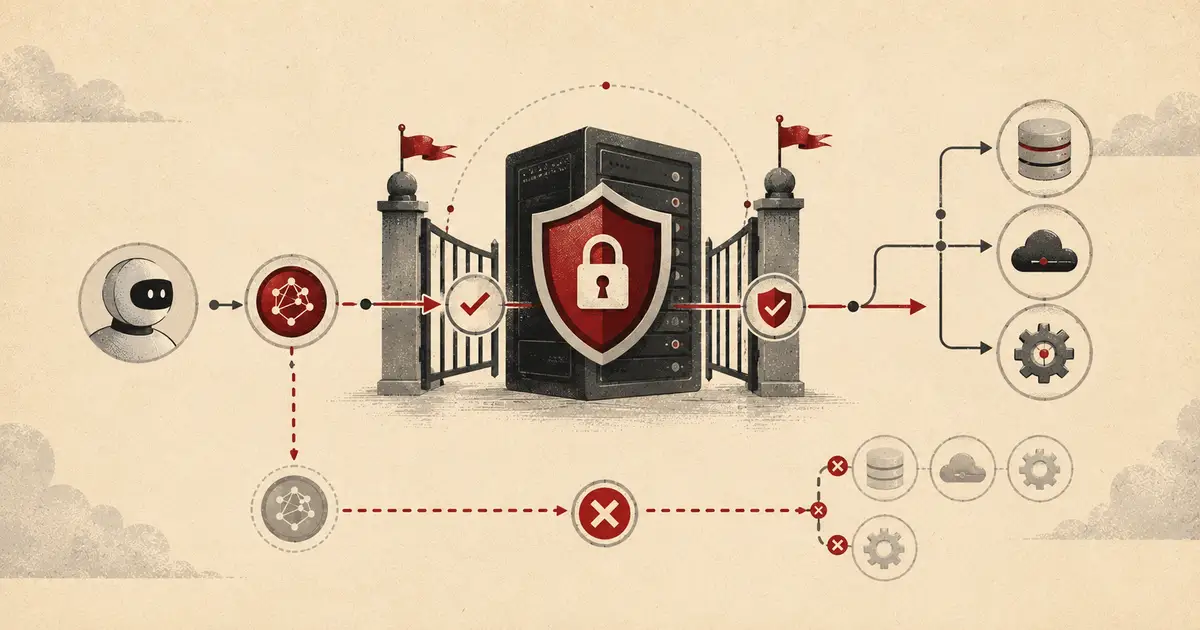
Most failures are not because teams know nothing about OAuth. They happen because MCP introduces new places to make familiar mistakes.
Token passthrough#
The MCP client token is for the MCP server. It is not a universal pass to every downstream API. If you pass that token to another service, you break audience boundaries and lose clean accountability.
Use a separate downstream credential, token exchange, or service-side integration. The downstream resource should know whether the action is being performed by a user, a service, or an agent acting under delegation.
Over-broad scopes#
Agents do not need admin access to be useful. Start read-only. Add write scopes only when the workflow proves it needs them. For destructive tools, add a second control: human approval, explicit confirmation, or a separate high-risk scope that is not granted by default.
This is the same lesson as AI code review. More access makes demos smoother and incidents uglier.
Confused deputy flows#
A confused deputy issue appears when a legitimate server is tricked into using its authority for the wrong client or redirect target. MCP proxy servers are especially sensitive because they can sit between a client, an authorization server, and a third-party API. Store consent per client and per user. Validate redirect URIs exactly. Do not assume that a browser consent cookie proves the current client should receive access.
Weak redirect handling#
Desktop clients often use localhost redirect URIs. That can be fine, but it has sharp edges: port conflicts, stale local callback listeners, and malicious local processes trying to race the callback. Use PKCE with S256, verify state, bind the callback to the request that initiated it, and close the listener immediately after use.
No denial logs#
Denied tool calls are as useful as successful calls. They show which tools agents tried to reach, which scopes are missing, and whether prompts are pushing the system toward risky behavior. If you only log successful calls, you are throwing away the most useful early-warning signal.
Building against a moving spec without version discipline#
MCP is moving quickly. As of July 9, 2026, the MCP project has a release candidate for the 2026-07-28 specification, and the blog says the final specification is planned for July 28, 2026. Treat that release candidate as an upcoming compatibility target, not as a finalized spec. Version your MCP behavior, read the final spec when it lands, and keep compatibility tests around discovery, token validation, and error responses.
See the MCP blog’s 2026-07-28 release candidate post for the upcoming protocol direction.
Frequently Asked Questions#
Does MCP require OAuth?#
Not for every server. Local STDIO servers can use environment-based or host-provided credentials because they run inside a local trusted context. Remote MCP servers that touch user data or production systems should use OAuth-style authorization with short-lived, scoped tokens.
What is the difference between MCP authentication and MCP authorization?#
Authentication verifies who or what is calling the MCP server. Authorization decides whether that identity can call a specific tool, read a resource, or perform a write action. Production servers need both checks before tool execution.
Can I use API keys for MCP authentication?#
API keys can be acceptable for local prototypes or tightly controlled internal tools, but they are weak for production remote servers. They are usually long-lived, shared across users, hard to audit, and easy to leak through config files or logs.
Why does MCP use PKCE?#
PKCE protects the authorization code exchange. It helps ensure that the client redeeming the authorization code is the same client that initiated the flow, which matters for desktop clients, local callbacks, and other public-client scenarios.
Should the MCP server pass the user’s token to downstream APIs?#
No. The MCP access token should be issued for the MCP server. If the server needs to call a downstream API, use a separate upstream token, token exchange, or a controlled service credential. Passing the client’s token downstream breaks audience boundaries and makes audit trails unreliable.
Final Takeaway#
MCP authentication is not a checkbox. It is the control plane for deciding which agents, users, and clients can make real systems move. For local experiments, keep it simple. For remote servers, enforce OAuth-style discovery, PKCE, resource-bound tokens, scoped tool access, and audit logs before the first tool call runs. The safest production MCP server is not the one with the cleverest prompt; it is the one where the model cannot outrun the permission boundary.
 By Amaresh Adak15 min read
Comments
Sign in to join the discussion.
No comments yet. Be the first to share your thoughts.