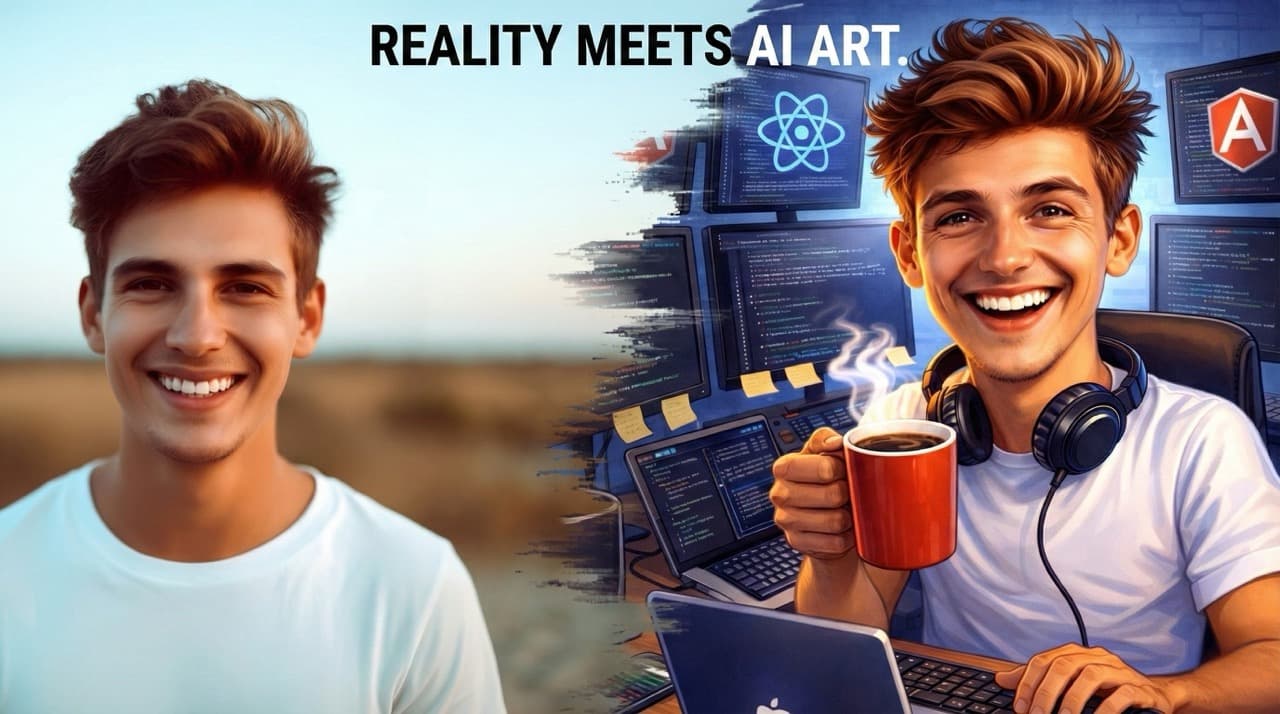
The first viral AI trend of 2026 has arrived, and it's turning social media feeds into digital caricature galleries. Users everywhere are sharing exaggerated cartoon versions of themselves—complete with job-specific props and personality quirks—all generated in seconds using ChatGPT.
What started as a simple prompt has become a cultural phenomenon that briefly crashed OpenAI's servers. Here's everything you need to know about this trend and how to create your own AI caricature.
What is the ChatGPT Caricature Trend?#
The ChatGPT caricature trend transforms your photos into playful, exaggerated cartoon illustrations that highlight your:
- Profession – Your job and work environment
- Personality traits – Quirks and characteristics
- Unique features – Glasses, hairstyle, accessories
Unlike traditional avatar trends that aimed for idealized versions, this trend embraces humor and specificity, creating images that feel personal and instantly shareable.
The trend exploded in early February 2026 when users discovered ChatGPT could generate caricatures rivaling traditional hand-drawn artwork—combining the charm of boardwalk caricatures with the precision of editorial cartoons.
Why Did This Trend Go Viral?#
Three key factors fueled the rapid spread:
| Factor |
Why It Matters |
| Personalization |
AI weaves in specific details about your job, hobbies, and personality |
| Shareability |
Perfect size for social media with instant visual engagement |
| Accessibility |
No drawing skills needed—just a photo and a prompt |
The trend also taps into our natural curiosity about how AI perceives us. The humor and lightheartedness make these caricatures perfect conversation starters on LinkedIn and personal platforms alike.
How the Technology Works#
ChatGPT generates caricatures by combining image recognition with text-based instructions:
- Upload a photo → AI identifies facial structure, expressions, and proportions
- Provide a prompt → AI knows how to exaggerate elements and what style to follow
- Generate image → GPT-4o creates the caricature
The system uses GPT-4o's integrated image generation capabilities, which surpass the previous DALL-E generator. For users with extensive ChatGPT history, the AI can draw from past conversations to add contextual details automatically.
Step-by-Step Guide to Creating Your Caricature#
Step 1: Access ChatGPT#
Log in through the website or mobile app. Free users get up to 5 image generations per day.
Step 2: Upload Your Photo#
Click the attachment button and upload a clear photo. For best results:
- ✅ Use a front-facing headshot
- ✅ Ensure good lighting
- ✅ Keep a neutral background
- ✅ Show your face clearly (no sunglasses or hands covering face)
Step 3: Enter Your Prompt#
The Viral Prompt (works best if you've used ChatGPT before):
Create a caricature of me and my job based on everything you know about me.
For New Users (provide specific details):
Create a caricature of me and my job. I'm a software developer who works
primarily with React and Angular, often seen with coffee and multiple monitors.
Advanced Prompts for Better Results#
The Power User Prompt Template#
You are a magazine caricaturist. Produce one 4:5 image with clean outlines,
high contrast, and a flat-color palette. Focus on likeness; keep exaggeration
tasteful. Add two prop jokes tied to [YOUR INDUSTRY] and a background Easter
egg referencing [YOUR PERSONAL INTEREST].
Profession-Specific Prompts#
👨💻 For Tech Professionals:
Exaggerate features of a software developer surrounded by laptops, code
snippets, and coffee cups. Playful cartoonish style, humorous expression,
emphasize glasses and casual attire, keep facial identity recognizable,
vibrant colors, dynamic pose.
🎨 For Creative Professionals:
Create a caricature of a graphic designer with oversized stylus, color
palettes floating around, artistic studio background, exaggerated creative
expression, bold colors, professional yet playful tone.
👩⚕️ For Healthcare Workers:
Generate a caricature of a nurse with medical equipment, stethoscope,
caring expression, hospital setting, professional uniform, warm colors,
approachable demeanor.
> 💡 Pro Tip: Use specific nouns rather than adjectives. "Calipers, steel-toe boots, and blueprint roll" produces better results than "hardworking and precise."
Tips for Optimal Results#
Photo Quality Matters#
| Do This |
Avoid This |
| High-contrast lighting |
Low light or shadows |
| Clear facial features |
Sunglasses or hats covering face |
| Signature accessories (if any) |
Busy backgrounds |
| Front-facing angle |
Side profiles |
Get Multiple Variations#
Request variations in your prompt to compare different styles:
Create 3 different caricature variations of me - one playful, one professional,
and one highly exaggerated cartoon style.
Keep It Tasteful#
Add this to your prompt for respectful results:
...playful but respectful exaggeration, focus on professional identity...
| Tool |
Best For |
| MyEdit |
Multiple AI models (FLUX, Stable Diffusion), daily free credits |
| Media.io |
Image-to-image generation, retains actual identity |
| Midjourney |
Artistic interpretations, unique styles |
| Adobe Firefly |
Professional-grade output, commercial use |
| Ideogram |
Text integration in images |
> Tip: Keep your prompt structure consistent when switching tools—only adjust style instructions to match each model's strengths.
Legal and Ethical Considerations#
✅ What's Safe#
- Using your own photos for AI editing
- Personal use of generated images
- Sharing on social media
⚠️ Be Careful With#
- Modifying others' photos without permission
- Commercial applications (requires careful consideration)
- Referencing copyrighted characters (Disney, Marvel, Pixar)
🛡️ Built-in Protections#
ChatGPT's filters actively prevent:
- Generation of copyrighted characters
- Trademarked logos or designs
- Sensitive personal information in images
> Remember: Caricature amplifies differences. Ask for "playful but respectful exaggeration" and review outputs before sharing.
The Impact and Future of AI Caricatures#
Why Professionals Love It#
These caricatures serve as low-stakes personal brand assets:
- LinkedIn profiles – More personable than standard headshots
- Slack avatars – Add personality to team communication
- "Meet the Team" pages – Stand out from stock photos
The Bigger Picture#
The trend demonstrates how AI tools are democratizing creative expression. What once required hiring a caricature artist or visiting a theme park now takes seconds and costs nothing for basic use.
Quick Reference: Best Prompts#
Copy-Paste Ready Prompts#
Basic Caricature:
Create a fun caricature of me in a cartoon style with exaggerated features.
Professional Caricature:
Create a professional caricature of me suitable for LinkedIn, showing my
work as a [YOUR PROFESSION], with relevant props and a clean background.
Detailed Custom Caricature:
Create a caricature of me with these details:
- Profession: [YOUR JOB]
- Props: [ITEMS RELATED TO YOUR WORK]
- Style: Playful but professional
- Colors: Vibrant and modern
- Background: Simple office/workspace setting
Keep my facial features recognizable but tastefully exaggerated.
Final Thoughts#
The ChatGPT caricature trend showcases how AI image generation has matured to produce personalized, contextual content that resonates with users on both professional and personal levels.
Whether you're looking to:
- Update your LinkedIn profile with something more personable
- Create engaging social media content
- Have fun seeing how AI interprets your professional identity
...this trend offers an accessible entry point into AI-powered creativity.
As these tools continue to evolve, the caricature trend stands as a perfect example of how AI can amplify human creativity rather than replace it—turning everyone into both the subject and curator of their own digital art gallery.
Have you tried the ChatGPT caricature trend? Share your results in the comments below!
 By Amaresh Adak7 min read
Comments
Sign in to join the discussion.
No comments yet. Be the first to share your thoughts.