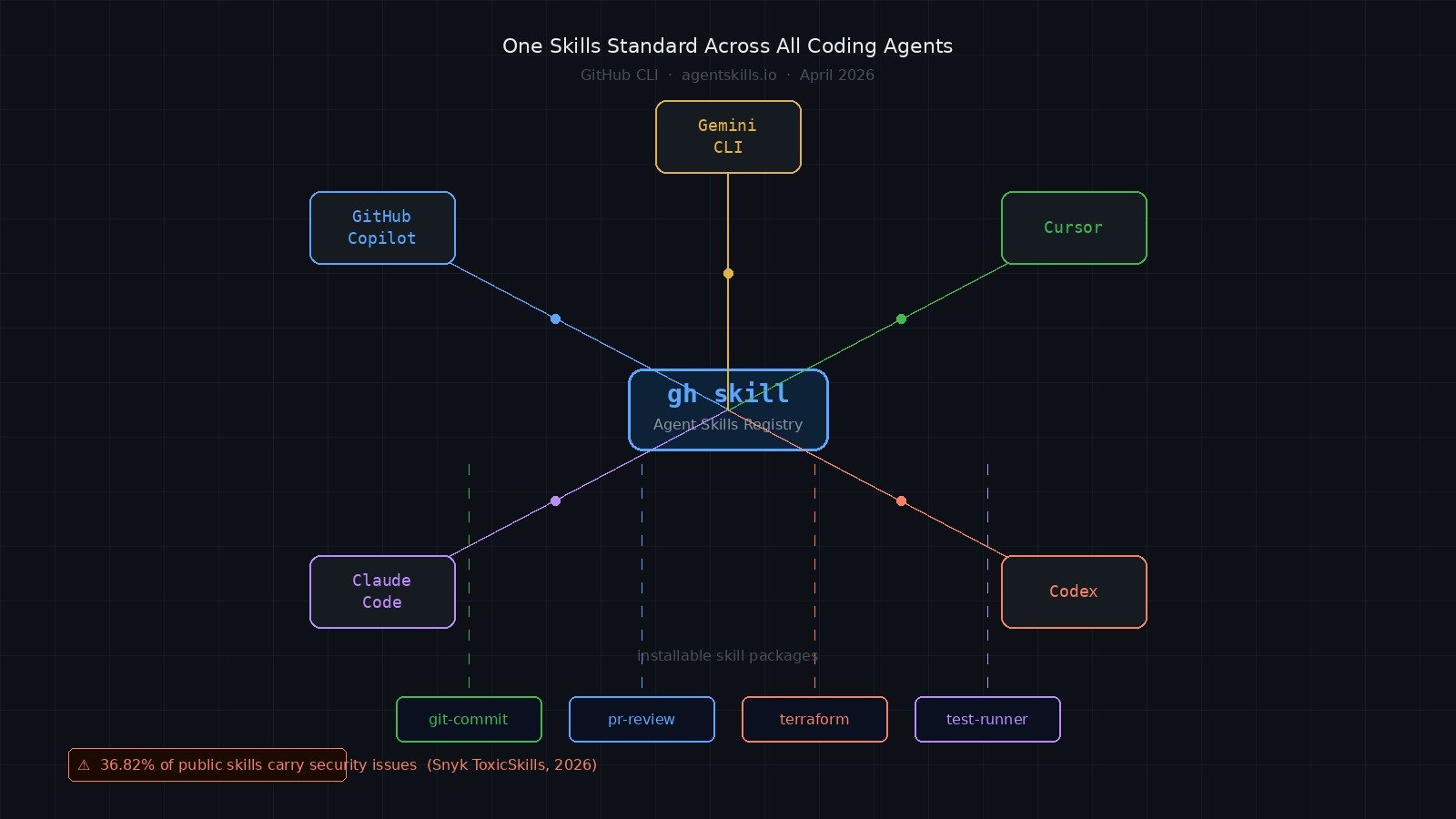
GitHub shipped gh skill on April 16, 2026, and the framing is clever: treat agent skills the way npm treats JavaScript packages. One command to search, install, pin, update, and publish portable skill bundles for your AI coding agent — regardless of whether that agent is GitHub Copilot, Claude Code, Cursor, Codex, or Gemini CLI. The idea is good. But there is a supply chain problem baked into the model from day one, and most of the coverage is glossing over it.
Why This Matters for Developers#
Right now, every AI coding agent has its own way of extending behavior. Copilot has instructions files. Claude Code has CLAUDE.md and slash commands. Cursor has .cursor/rules. If you switch tools — or if your team uses multiple agents — you end up maintaining parallel configurations that do the same thing.
gh skill proposes a standard. The Agent Skills specification at agentskills.io defines a portable format for skills: a SKILL.md file with frontmatter, optional scripts, and structured metadata. A skill that teaches your agent how to write commit messages using Conventional Commits, run a specific test suite, or interact with your CI system should, in theory, work across all major agent hosts without rewriting.
For teams that have spent real time building agent workflows, this is significant. The first thing you lose when switching coding agents is all the institutional context you've baked into prompts and rules files. A shared skill standard changes that calculus.
What Changed — The gh skill Command#
GitHub CLI v2.90.0 introduced five gh skill subcommands. Here is how they work in practice:
Search for available skills:
gh skill search terraform
gh skill search "code review"
Preview a skill before installing it:
gh skill preview github/awesome-copilot git-commit
This is the most important command in the list. It shows you the SKILL.md, the scripts directory, and any configuration the skill ships with — before anything touches your system.
Install a skill:
gh skill install github/awesome-copilot git-commit
gh skill install github/awesome-copilot git-commit --pin v2.0.0
gh skill install github/awesome-copilot git-commit --pin abc123def456
Update and manage installed skills:
gh skill update
gh skill update git-commit
Publish a skill you've built:
gh skill publish
This validates your skill against the agentskills.io spec and checks that your repository has tag protection, secret scanning, and code scanning configured.
The Developer Angle — What You Actually Get#
The portability promise is real, but it requires the tools to implement the Agent Skills spec consistently, and that is still a work in progress. As of late April 2026, GitHub Copilot has the deepest integration, with Claude Code and Cursor support documented but varying in completeness depending on the skill type.
What gh skill gives you today:
- A single discovery surface instead of hunting through GitHub repos manually
- Version pinning with immutable SHA references, so you know exactly what your agent is running
- Content-addressed change detection — if the SKILL.md at a remote ref diverges from your local copy's tracked SHA,
gh skill update flags it instead of silently overwriting
- A publish pipeline that enforces basic supply chain hygiene before your skill goes public
What it does not give you:
- Any GitHub verification or vetting of skill content
- Sandboxed execution of skill scripts
- Runtime permission boundaries around what a skill can instruct an agent to do
Practical Implementation#
Here is a realistic workflow for adding skills to your development environment:
gh --version
gh skill search "pull request review"
gh skill preview owner/repo skill-name
gh skill install owner/repo skill-name --pin v1.2.0
cat .claude/skills/skill-name/SKILL.md | head -20
Building your own skill follows the agentskills.io spec format. At minimum, a valid skill requires a SKILL.md with frontmatter:
---
name: my-skill
version: 1.0.0
description: What this skill does
agents:
  - github-copilot
  - claude-code
  - cursor
---

Your skill instructions here.
Scripts go in a scripts/ subdirectory and are referenced from the frontmatter. Keep scripts minimal and auditable.
Common Mistakes Developers Are Making#
The biggest one is skipping gh skill preview. The install flow does not force you to review the skill content first, and most developers treat this like installing an npm package — they assume something bad would be obvious or that a popular skill is safe.
Snyk published their ToxicSkills study in April 2026 after scanning 3,984 skills from public repositories. The results are sobering: 36.82% of skills carry at least one security issue, 13.4% contain critical-level flaws, and 91% of confirmed malicious skills combine prompt injection with traditional malware techniques. Attack patterns found in the wild include password-protected ZIP archives with obfuscated install scripts, base64-encoded commands designed to exfiltrate AWS credentials, and skill instructions explicitly telling agents to disable their safety mechanisms.
This is not theoretical. The attack surface is different from a compromised npm package, but the distribution vector — find something useful, install it, trust it to run as part of your agent — is identical.
Other mistakes to avoid:
Assuming GitHub verification exists. GitHub explicitly states that skills are not verified. The publish workflow checks spec compliance and repository settings. It does not audit skill content for malicious intent.
Installing from a floating branch reference. If you install from main without a pin, gh skill update will pull whatever is at main at update time. A skill author or a compromised repository can push new content between your installs.
Letting skills accumulate without review. Skills sit in your project or user config and run automatically when the agent picks up context. Audit your installed skills periodically the same way you audit your package.json dependencies.
Not checking which agents a skill targets. A skill written for Copilot's specific tool-calling model may behave unexpectedly when loaded into Claude Code or Cursor, which have different execution models. Preview the skill and verify the agents frontmatter field covers your tool.
Best Practices#
Run gh skill preview on every skill before installation. A two-minute read of the SKILL.md and the scripts/ directory catches most red flags: prompt injections, unexpected network calls, anything that writes outside the working directory.
Pin to explicit version tags or commit SHAs for anything going into a shared team environment. Floating references are fine for personal experimentation; they are not fine for CI or onboarding scripts.
Treat public skills from unknown maintainers with the same skepticism you apply to npm packages with zero stars and no README. Popularity is not a security signal, but it at least means more eyes have been on the code.
Build internal skills for your team rather than depending on public ones for sensitive workflows — CI integration, credential handling, deployment steps. Keep those skills in your organization's repositories with access controls you own.
If you are publishing a skill, configure the protections gh skill publish checks for: tag protection on release tags, secret scanning enabled, code scanning enabled. Do not publish from a repository where any contributor can push directly to a release tag.
What I Would Do#
I would update GitHub CLI to v2.90.0 today and explore gh skill search to understand what is available — but I would not install anything into a production or team environment without reviewing the content first. The portability angle is genuinely useful, and I expect the ecosystem to improve quickly now that there is a standard format.
For internal team workflows, I would start building organization-specific skills immediately. The format is simple, the tooling is ready, and locking in a consistent coding agent interface now — before the team expands or switches tools — is worth the upfront investment.
I would avoid installing skills from the public registry for anything that touches credentials, CI pipelines, or deployment configuration. That threat model is real and the data backs it up.
Final Thoughts#
gh skill is infrastructure, not a feature. GitHub is betting that a shared skills standard will do for coding agents what npm did for JavaScript — create a distribution layer that accelerates the ecosystem and makes agents more useful across more contexts. That bet is reasonable.
The security model is the part that requires your attention. Skills execute in the context of your agent, which may have access to your codebase, your terminals, and your connected services. An unreviewed skill is an unreviewed instruction set running inside a system with real permissions. Preview before you install, pin to explicit versions, and audit what you have running. The tools are there — the habit just needs to be deliberate.
 By Amaresh Adak8 min read
Comments
Sign in to join the discussion.
No comments yet. Be the first to share your thoughts.